Challenge & under attack mode
A challenge asks the browser to prove it is a real browser before it reaches your site. It needs no third-party service (no CAPTCHA provider) and stores nothing on the server.
Challenge types
| Type | What the browser does | Stops |
|---|---|---|
| JavaScript (proof of work) | Solves a small computation, usually within a second or a few | Bots that don't run JavaScript; makes mass requests expensive |
| Cookie check | Accepts a cookie and sends a form back | Simple scripts and HTTP clients |
Visitors who pass get a signed cookie bound to their IP address (optionally also their browser) and are not challenged again until it expires (Pass valid for, default 24 hours for rules). For IPv6 the cookie is bound to the visitor's /64 network, because devices change their temporary IPv6 address within it regularly. A visitor whose IP address changes (for example from Wi-Fi to mobile data) is challenged again.
Non-browser clients can't pass
API clients, mobile apps, feed readers, monitoring and search engine crawlers can't solve a challenge. Put an Allow rule for them above the challenge, or limit the challenge to the paths people use in a browser.
Challenge with a rule
Create a security rule with the action Challenge, e.g. for /login or for a country
that sends a lot of abuse. Block rules still apply to visitors who passed.
Under attack mode
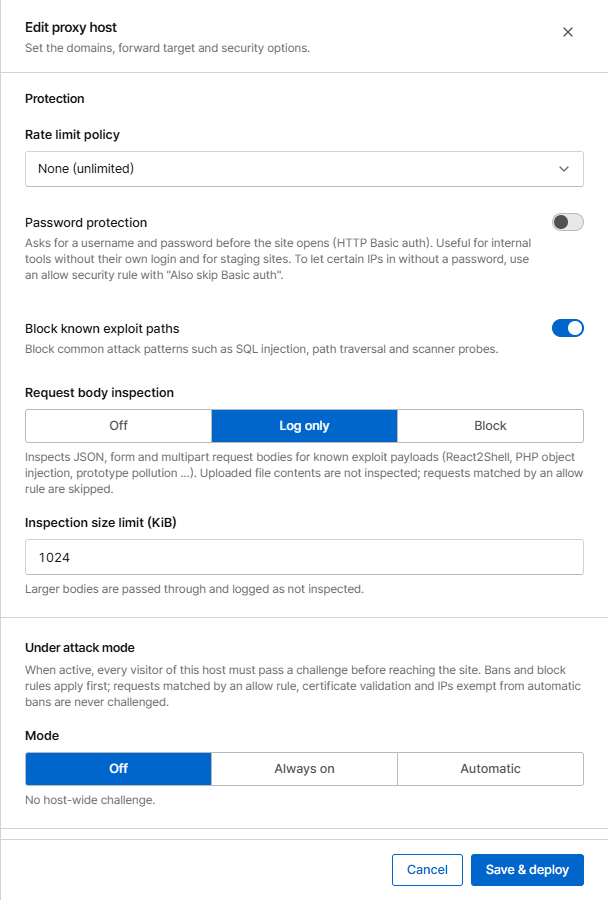
Under attack mode challenges every visitor of a host. Set it in the proxy host form under Protection → Under attack mode.
| Mode | Behaviour |
|---|---|
| Off | No host-wide challenge (default) |
| Always on | Every request without a pass gets the challenge. Turn it on while you are under attack |
| Automatic | Turns on by itself when requests per second or the share of blocked requests goes above a threshold, and off again once traffic has stayed below for the activation period |
Automatic mode settings:
| Setting | Default |
|---|---|
| Requests per second | 200 |
| Blocked share | 50 % (0 = not used) |
| Window | 30 seconds |
| Stay on for | 15 minutes, extended while still above a threshold |
When it turns on or off you get an alert, and the dashboard shows a banner. Deactivate now ends an automatic activation early.
Never challenged: requests an allow rule matched, certificate validation, and IPs in the automatic-ban exemptions.